Beyond Remote2.5.1.450
Publisher Description
New - Support for Windows Vista
Beyond Remote is a powerful remote access and support tool for individuals, businesses, and service providers.
New to Beyond Remote:
- Entirely new user interface featuring 6 new themes
- Embedded Multilingual Functionality - Automated translations of Beyond Remote in Spanish, German, Russian,
French, Dutch, Italian, Portuguese and Traditional Chinese automatically display based on your computer's settings
or manual selection.
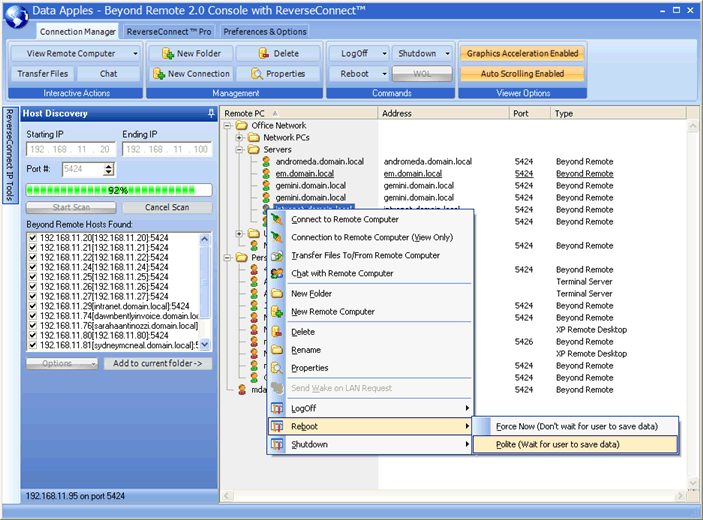
Host Discovery - The Console user is able to scan a range of IP addresses to find installed Beyond Remote Hosts.
Beyond Remote can then automatically create connections under the folder of your choice.
Other standard features include: Wake On LAN, embedded support for XP Remote Desktop & Terminal Server
Connections, File Transfer, Live Chat, Boot/Reboot/Shutdown, Secure 128 Bit encryption, scaled or full screen
window sizes, Copy and Paste between computers & Great Technical Support via our online Forums!
Beyond Remote is simple, secure and productive. Give Beyond Remote a try today and receive a free 30 day trial on all features.
About Beyond Remote
This Remote Computing program is available in English, German, French, Spanish, Italian, Russian, Chinese Simplified, Chinise Traditional, Dutch. It was last updated on 29 September, 2026. Beyond Remote is compatible with the following operating systems: Windows.
The company that develops Beyond Remote is Data Apples, Inc.. The latest version released by its developer is 2.5.1.450. This version was rated by 2 users of our site and has an average rating of 4.5.
The download we have available for Beyond Remote has a file size of 6.3 MB. Just click the green Download button above to start the downloading process. The program is listed on our website since 2008-01-01 and was downloaded 209 times. We have already checked if the download link is safe, however for your own protection we recommend that you scan the downloaded software with your antivirus. Your antivirus may detect the Beyond Remote as malware if the download link is broken.
How to install Beyond Remote on your Windows device:
- Click on the Download button on our website. This will start the download from the website of the developer.
- Once the Beyond Remote is downloaded click on it to start the setup process (assuming you are on a desktop computer).
- When the installation is finished you should be able to see and run the program.
Program Details
General
System requirements
Download information
Pricing
Version History
version 2.5.1.450
posted on 2008-01-01
Version 2.5 Updates. - Added better support for multi-monitors. - Removed ReverseConnect from the Console. .
version 1.9.2.1230
posted on 2005-12-27
Fixes / Enhancements . ----------------------------- . - Fixed an error message that was showing up under certain circumstances during the installation of the server. . . - Increased the speed of the status polling in the client. There are now two threads running simultaneously that split up the . load. . . New Features . ------------------ . - Added auto scrolling to the viewer. When your mouse moves towards the edge of the screen and the remote computer is . running a larger resolution, the client will now auto scroll. This feature can be enabled or disabled by clicking on "Action" and . toggling the checkmark in the option labeled "Enable Auto Scrolling in Viewer". . . - Added ability to send an invitation email to a friend which is available on the mail toolbar in the client. This email will tell the . recipient about Beyond Remote and provide a link to download it. . . - Added ability to purchase Beyond Remote directly from within the server. You can now perform a secure purchase directly . from within the server. In addition, the registration code will automatically be entered for you.
